Mark All Read in Monocle
If you’re a Monocle user, you might have noticed a new feature in your UI today. If you self-host, you’ll want to update your installation to the latest version. Two nice “quality of life” features have gone live, and I’m a little excited, because I helped build one of them 😁
The biggest feature I’ve been missing in Monocle over, say, Feedly, is a “mark all read” button. I follow too many busy sources to be able to keep up with everything, so I frequently mark everything as read and carry on. It helps me not get overloaded.
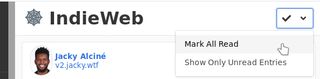
Aaron had raised an issue to build the feature at some point, but I wanted it, and had a spare weekend, so figured I’d make myself useful!
In all, it was surprisingly straightforward. The Microsub spec is well documented, so I knew how it needed to work. All I had to figure out was how to fit that into how Monocle already did things, and there was already a “mark read” for single entries to work from.
The UI took the longest to build, mostly because I had to figure out the Bulma frontend framework. Rosemary had already come up with some ideas on how it should work, so the hard part had pretty much been done.
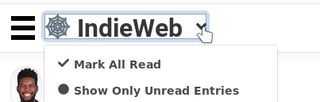
And with a little bit of testing, there it was - “Mark All Read” in Monocle. I’ve been running it in my install for a little over a week now, and I hope you’ll find it as useful as I have if you’re a heavy Monocle user.
I can’t take any credit for in the slightest for the new “Show Only Unread Entries” feature - to my knowledge, that was all Aaron. It was a nice surprise to find once I updated my local install from the master branch!